
Invoices & receipts to Excel, without the typing.
Drop in PDFs or photos of supplier invoices and receipts. Get one spreadsheet with every line item, UEN, GST and total — with an automatic maths check on each document. No subscription, no sign-up. 3 free documents, then pay per document in SGD.
Try it now
Loading…You've used your free documents
Pick a credit pack. 1 credit = 1 document. No subscription; credits last 12 months.
Already bought credits? Enter your code
Paid but didn't get your credits? Recover them
Enter the email address you used at Stripe checkout (or your checkout reference starting cs_live_). This works for payments from the last 30 days that were never claimed.
See what you get
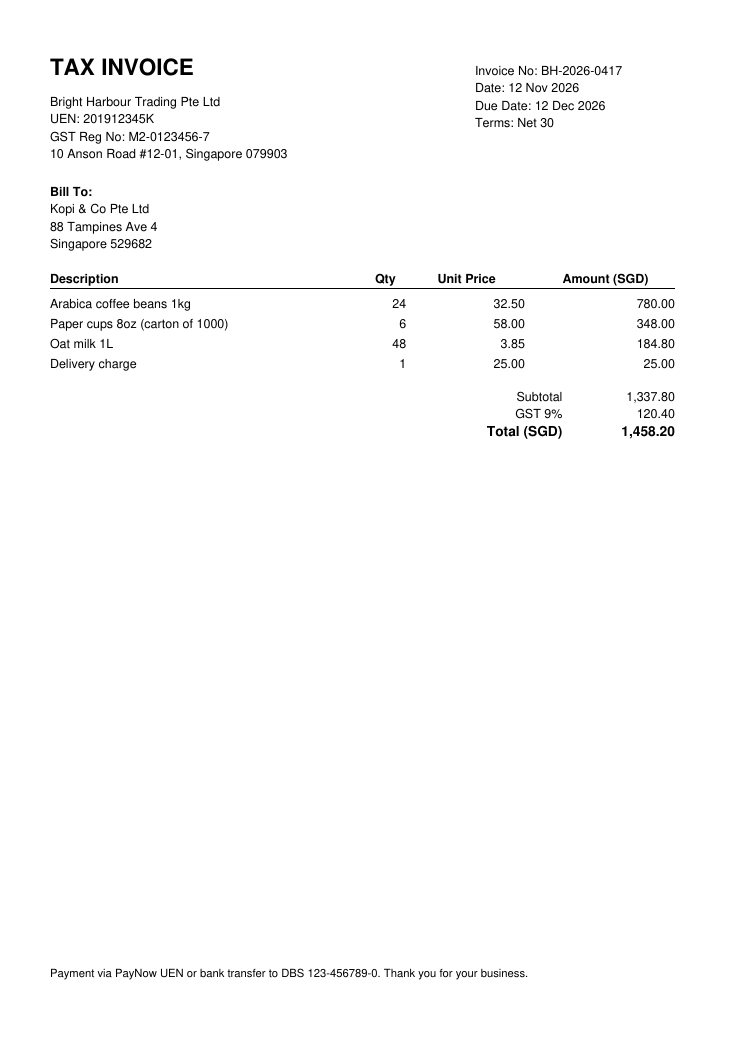
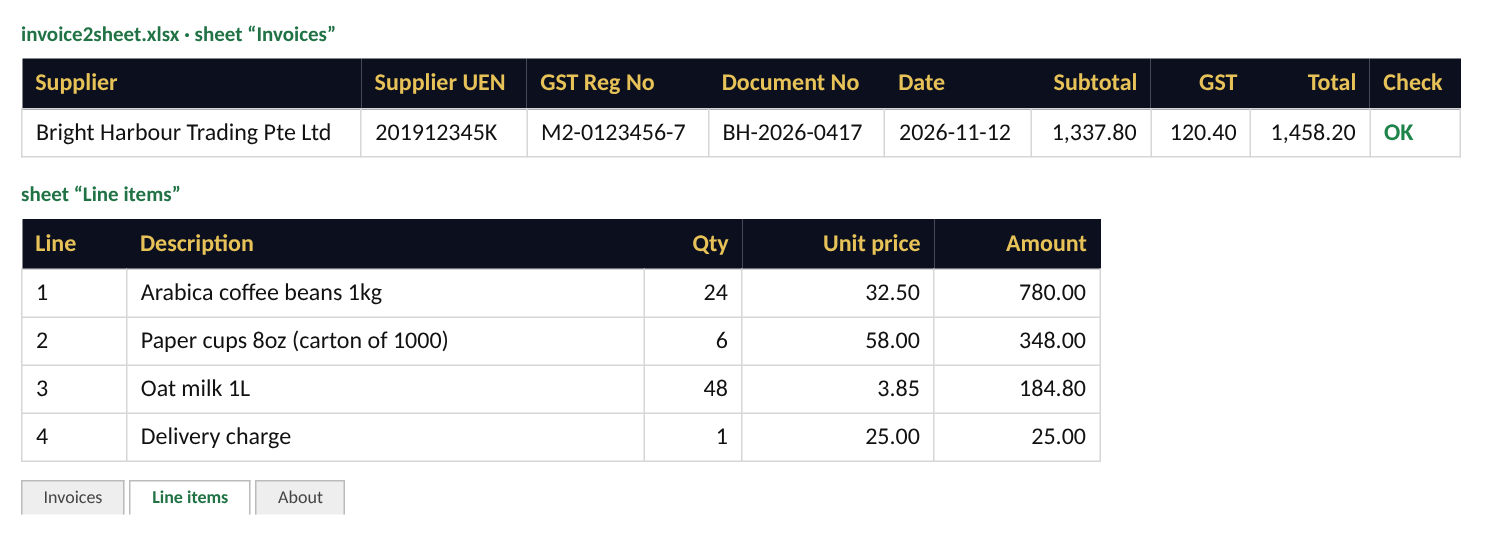
A fictional supplier invoice in, a structured spreadsheet out. The maths check ran on every number.
Every line item
Description, quantity, unit price and amount per row — plus supplier name, UEN, GST reg. no., invoice no., dates, GST and total.
Built-in maths check
Lines vs subtotal, subtotal + GST vs total, qty × price vs amount. Anything off is flagged REVIEW so you only check what needs checking.
PDFs, scans & photos
Digital PDFs, scanned PDFs and phone photos of receipts. Batch up to 10 files into one workbook.
Simple pay-per-document pricing
Prices in SGD. No GST charged. 3 free documents first. Credits are valid for 12 months.
Paying by card via Stripe. We never see or store your card details.
FAQ
What happens to my files?
They are processed and then deleted. Temporary copies exist only while your file is being read, and the generated spreadsheet is kept in memory for 15 minutes so you can download it, then discarded. See the privacy & PDPA notice for what is sent to our AI provider.
How accurate is it?
On clean invoices it is very good, but it is AI and can make mistakes, especially on blurry photos or unusual layouts. That is why every document gets an automatic maths check and a REVIEW flag when numbers do not add up. Always check before posting to your books.
Is the data from Singapore invoices handled properly?
It picks up UEN, GST registration number, GST amount and SGD totals. Other currencies are read too and shown in the Currency column.
What counts as one document?
One uploaded file of up to 6 pages (for example a multi-page invoice) = 1 credit. If a file cannot be read, it is not charged.
Does it work with Xero, QuickBooks or AutoCount?
There is a Xero bills CSV download in Xero’s bill import layout (how it works); bills arrive in Xero as drafts. For QuickBooks, AutoCount or other software use the Excel or CSV downloads and map the columns in that software’s own import. We do not offer a QuickBooks-specific file.
Does it check my GST numbers?
It reads the UEN and GST registration number as printed and checks the format. It does not look them up on IRAS or ACRA registers, and it does not prepare your GST return. See receipts to Excel for GST records.
I paid but did not get my access code
After payment you are sent back to this site, which shows your code. If that did not happen, open Paid but didn’t get your credits? in the tool above and enter your Stripe receipt email or checkout reference. If that does not work, email us with your receipt.
Where are my documents processed?
The text or page images are sent over an encrypted connection to our AI provider (currently DeepSeek, which may process data outside Singapore), then discarded. Please do not upload documents containing NRIC/FIN or other sensitive personal data. See the privacy & PDPA notice.
I need help or a refund
Email support@tianqi-ai.tech. See the refund policy.